What the RØDECaster App does.
One app for the Pro II, Duo, Video and Streamer X. Here is every job it takes off the touchscreen and puts on your computer.
Feature list
Audio Setup
Assign any of the nine Pro II channels (seven on the Duo) to a fader by drag and drop. Physical faders sit top-left, the three virtual faders top-right; the four analog inputs are on the top row of sources and Bluetooth, USB and SMART pads on the bottom. Recolour channels, stereo-link pairs, unassign or clear everything in one click.
Device Configuration
Three sections. Outputs: headphone type, monitor output and multitrack settings. Display: brightness and metering. System: MIDI, language, date and time, and the network settings used for Wi-Fi and Ethernet.
SMART pad management
Load sounds onto pads by dragging files in or through the normal file picker, export them back out, change playback modes and rename pads. Corrupted or unsupported files are flagged rather than silently failing. Guide.
Transfer Recordings
Put the console into Transfer Mode and every recording on the microSD card is listed, playable, and trimmable. Export with presets for the popular podcast platforms, or go Custom and set the format, sample rate, bit rate and loudness yourself. Batch export and batch delete. Guide.
Firmware updates
Connect a console and the app shows its current firmware and available storage, and prompts you the moment a newer version exists. The Pro II, Duo and Video can also update themselves over Wi-Fi or Ethernet with no computer involved. Guide.
Scene Builder (RØDECaster Video)
Seven scenes, templated or fully custom, built on a live feed from the switcher. Resize and crop frames, round their corners, assign inputs and media, and save the whole lot as a Show you can export and import. Guide.
Remote control over the network
With a RØDECaster Video on the same network, every button in the Scene Builder mirrors the hardware live — switching, overlays, chroma key, media — even over Wi-Fi.
RØDE CallMe
Set up RØDE’s CallMe remote-guest feature for the Pro II and Duo from the app, including CallMe actions on the SMART pad backchannel options. Finalised in app version 2.0.98 with firmware 1.6.5.
Streamer X mix profiles
Save the current Streamer X mix as a named custom profile, or save a new one, and get at all 16 banks of SMART pads. USB hosting arrived with Streamer X firmware 1.2.0 and app 2.0.102.
Wireless receivers over USB
Since version 2.0.65 the Pro II and Duo can take RØDE wireless systems plugged into their USB-2 port as sources, and the app handles the configuration. Firmware 1.7.3 then gave wireless channels their own channel type, separate from the XLR inputs.
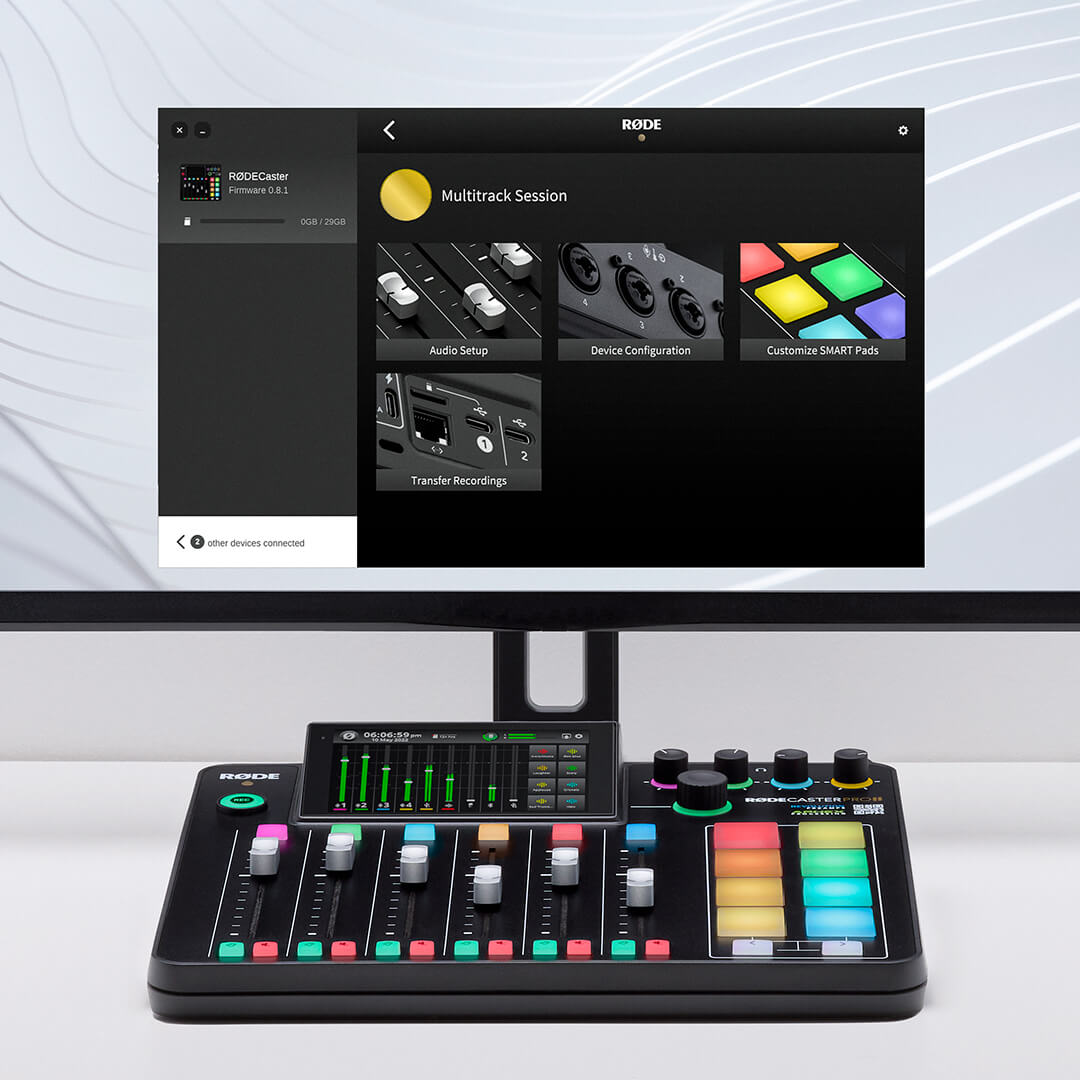
Windows 10 (version 1803) or later, or macOS 11 or later. A USB connection to the console (USB 1 on the Pro II and Duo, USB 2 on the Video), or the same network for the RØDECaster Video.
What changes from console to console.
RØDECaster Pro II
Nine channels across six physical and three virtual faders, eight pads with eight banks, four combo inputs.
RØDECaster Duo
Seven channels across four physical and three virtual faders, six pads, two combo inputs, MFi USB for iOS.
RØDECaster Video
Adds the Scene Builder, media library, overlays, Shows and network remote control.
Streamer X
Custom mix profiles, 16 pad banks, HDMI capture settings and firmware.
Everything above, free.
RØDECaster App 2.0.114 for Windows and macOS, hosted here.